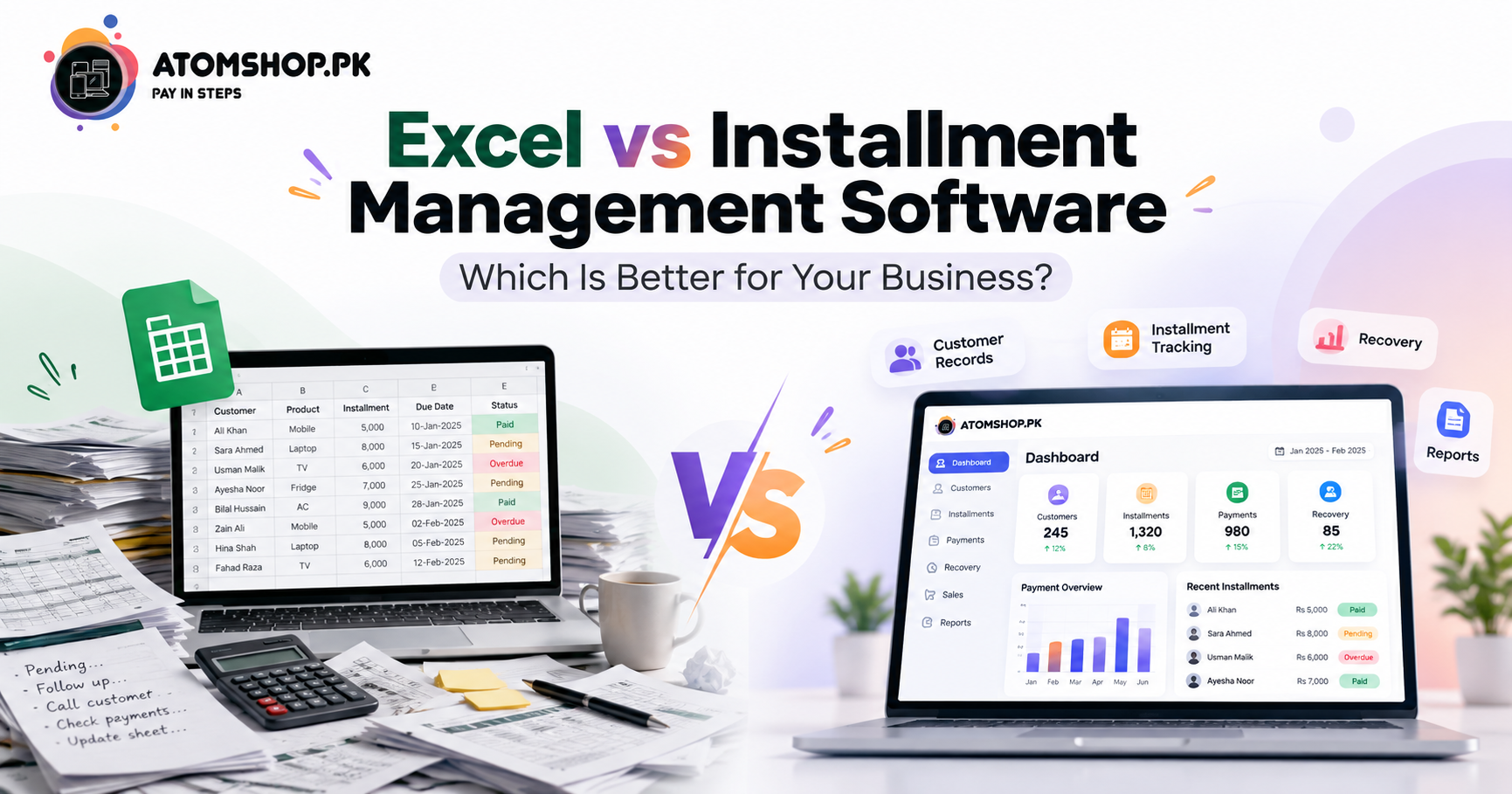
Excel vs Installment Management Software: Which Is Better for Your Business?
Managing an installment business requires accurate records, timely payment tracking, customer management, sales monitoring, and proper recovery management.
Many small businesses start with Excel spreadsheets because they are simple and familiar. But as the number of customers and transactions grows, managing an installment business through Excel can become time-consuming and difficult.
This is where installment management software can make a difference.
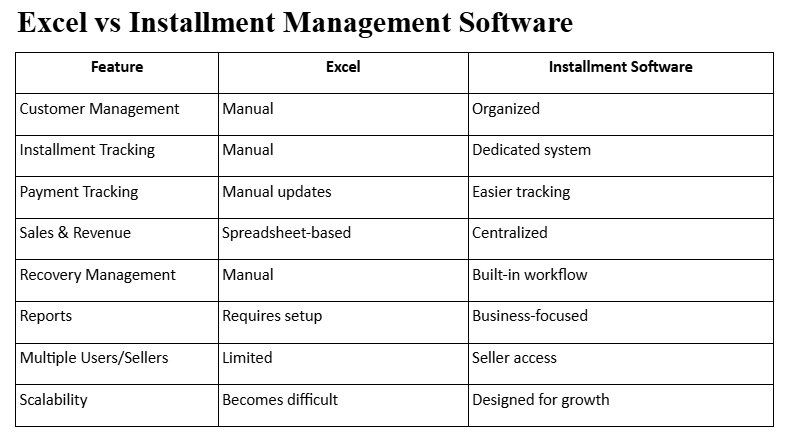
Let's compare Excel with dedicated installment management software and see which option is better for a growing business.
Why Installment Businesses in Pakistan Need Better Record Keeping
Installment sales are growing fast across Pakistan, from mobiles and laptops to bikes and home appliances. Customers now expect flexible payment plans, and shop owners are expected to track every payment accurately. If you want to understand the customer side of this trend, read our guide on how to buy products on installments in Pakistan. As demand rises, so does the need for a reliable way to manage records, and that is where the choice between Excel and dedicated software becomes important.
Managing an Installment Business with Excel
Excel can be useful when your business has a small number of customers and transactions.
You can create spreadsheets to record:
• Customer information • Product details • Installment amounts • Payment dates • Pending payments • Sales records
However, as your business grows, maintaining these records manually can become challenging.
Common Problems with Excel
With a large number of customers, you may face:
• Difficult-to-manage spreadsheets • Manual calculations • Data entry mistakes • Difficulty tracking pending installments • Time-consuming payment updates • Limited business reporting • Multiple files and sheets to manage
You may also need to update several records whenever a customer makes a payment.
What Is Installment Management Software?
Installment management software is specifically designed to help businesses manage customers, sales, installments, payments, and recoveries in a more organized way.
Instead of creating and maintaining multiple Excel sheets, businesses can manage their important operations through one centralized system.
AtomShop Software is designed for installment-based businesses such as electronics, mobile, appliance, bike, and other retail businesses.
It provides tools for:
- Sales and revenue tracking
- Installment management
- Customer and order management
- Recovery tracking
- Business reports
Seller access
Key Features to Look for in Installment Management Software
Not every system suits every shop, so check for these essentials before you choose:
- Automatic installment schedules: Due dates and balances should be calculated for you. You can also try our installment calculator to see how plans work.
- Recovery tracking: You should see who has paid, who is late, and who needs a follow-up.
- Multi-user access: Your sellers and staff should work in the same system, which is the idea behind Smart Seller.
- Clear reports: Daily, weekly and monthly sales and recovery summaries help you make decisions faster.
- Customer records in one place: Orders, payments and history should not be scattered across files.
Which One Should Your Business Choose?
If you have a small number of customers and only a few installment transactions, Excel may be enough to get started.
But if your business is growing and you are managing hundreds of customers, multiple sales, installment schedules, and recoveries, dedicated software can save time and help keep your operations organized.
The goal isn't simply to replace Excel. It's to have a system that is built around the specific requirements of an installment business.

How to Move from Excel to Installment Software
Switching is easier than most shop owners expect:
- Clean your current sheets. Remove duplicate customers and fix wrong amounts.
- List active installment plans. Note pending balances and next due dates.
- Move customer and order data into the new system in batches.
- Train your team so every seller records payments the same way.
- Review reports weekly to confirm everything matches your cash and records.
If you are starting a new venture, our post on starting your local business with AtomShop.pk is a good next read. You can also learn how Buy Now Pay Later is changing retail in Pakistan.
Why Choose AtomShop Software?
AtomShop Software helps installment businesses manage their daily operations from one place.
Instead of switching between Excel sheets, registers, calculators, and separate customer records, you can manage important business activities through a dedicated system.
Whether you're running a mobile shop, electronics business, appliance store, bike business, or another installment-based business, AtomShop Software can help you manage your sales, customers, installments, recoveries, and reports more efficiently.
Excel can be a good starting point for a small installment business, but managing a growing customer base through spreadsheets can become difficult.
If your business is expanding and you want a more organized way to manage sales, customers, installments, recoveries, and reports, dedicated installment management software can be a better long-term solution.
Frequently Asked Questions (FAQs)
Is Excel good enough for an installment business?
Excel works for a small number of customers and a few transactions. As records grow, manual updates, calculation errors and scattered files make it harder to manage.
What is installment management software?
It is a system designed to manage customers, sales, installment schedules, payments and recoveries in one place, instead of using multiple spreadsheets and registers.
Can I track recoveries with installment software?
Yes. A dedicated system gives you a recovery workflow so you can see pending and overdue payments and follow up on time.
Can my sellers use the software too?
Yes. AtomShop Software includes seller access, so multiple users can work in the same system. Learn more on our Smart Seller page.
Which businesses can use AtomShop Software?
Mobile shops, electronics stores, appliance dealers, bike businesses and other installment-based retailers. You can also read why AtomShop is a trusted choice or check our FAQs page.
How can I get started?
Contact our team and we will guide you through setup based on your business size.
Ready to move beyond spreadsheets?
Explore AtomShop Software and manage your installment business with a system built for your business needs.
AtomShop.pk Software — Manage Smarter. Grow Better.